Lost In Translation? Common Video Caption Fails And How To Fix Them
The difference between a share-worthy clip and one that gets skipped often comes down to one tiny detail: captions that actually make sense.
Author:Finn WildeReviewer:Liam JonesJul 21, 202590.6K Shares1.2M Views
Ever watch a video with subtitles so weird you burst out laughing - or worse, cringe on the creator’s behalf? We’ve all been there. The difference between a share-worthy clip and one that gets skipped often comes down to one tiny detail: captions that actually make sense.
In today’s global-first creator world, you can’t afford to rely on sloppy, automated subtitles that butcher your jokes or misrepresent your message. That’s why brands, solo creators, and marketers are leaning into smart tools like a link to video converter- think Pippit - to get captions right the first time and make their videos travel well across borders.
Ready to avoid embarrassing translation fails? Let’s dive into the classic blunders, easy fixes, and how to use a free video translator wisely so your next viral post doesn’t get lost in translation.
The Cringe Factor: Real-life Caption Fails We’ve All Seen
- Literal slang: When you use a term like ‘spill the tea’ and it ends up as ‘pour your drink.’ Yikes.
- Cultural mix-ups:Jokes that make sense in English but become offensive or awkward when translated word-for-word.
- Auto-caption bloopers:Voice-to-text that turns ‘salsa’ into ‘saucer’ or ‘muscle’ - ruining your recipe video or workout tutorial in one click.
Lost Viewers, Lost Trust: Why Translation Accuracy Matters
- Audience drop-off:Viewers stop watching when they can’t follow what’s going on - especially with audio off.
- Missed SEO boost:Poorly translated captions don’t show up in local searches the way they should.
- Brand reputation: Mistakes make you look sloppy and out of touch - not exactly the vibe you want when building global trust.
Your Easy Checks: Keep Captions Clear, Catchy, And Culturally Smart
- Read out loud:If your caption sounds clunky when you say it, it’ll read clunky too.
- Check slang:Swap region-specific slang for universally understood words - or adapt the phrasing for your target audience.
- Keep it short: Long lines overwhelm viewers. Aim for concise phrases that match your speaker’s pacing.
- Use style cues:Add punctuation and line breaks for better rhythm. (This helps your captions match the energy of your visuals.)
- Spot check AI:A free video translator can do wonders, but always review the final subtitles for tone and cultural fit.
Where A Free Video Translator Saves The Day
Automating subtitles is a game changer - but only if you know how to use your tools wisely. A quality free video translator, like the one built into Pippit’s workflow, takes the heavy lifting out of multilingual captions. It doesn’t just spit out robotic text - it aligns your message with local language nuance, giving you a polished, pro look without hours of manual work.
Let’s break down exactly how to put it to work for your next global-ready video.
Translating Your Captions The Easy Way With Pippit
So you’ve got a killer video ready to conquer YouTube, Instagram, or TikTok - now you just need captions that won’t embarrass you in another language. Here’s how to do it, step by step, with Pippit’s link to video converter and free video translator combo.
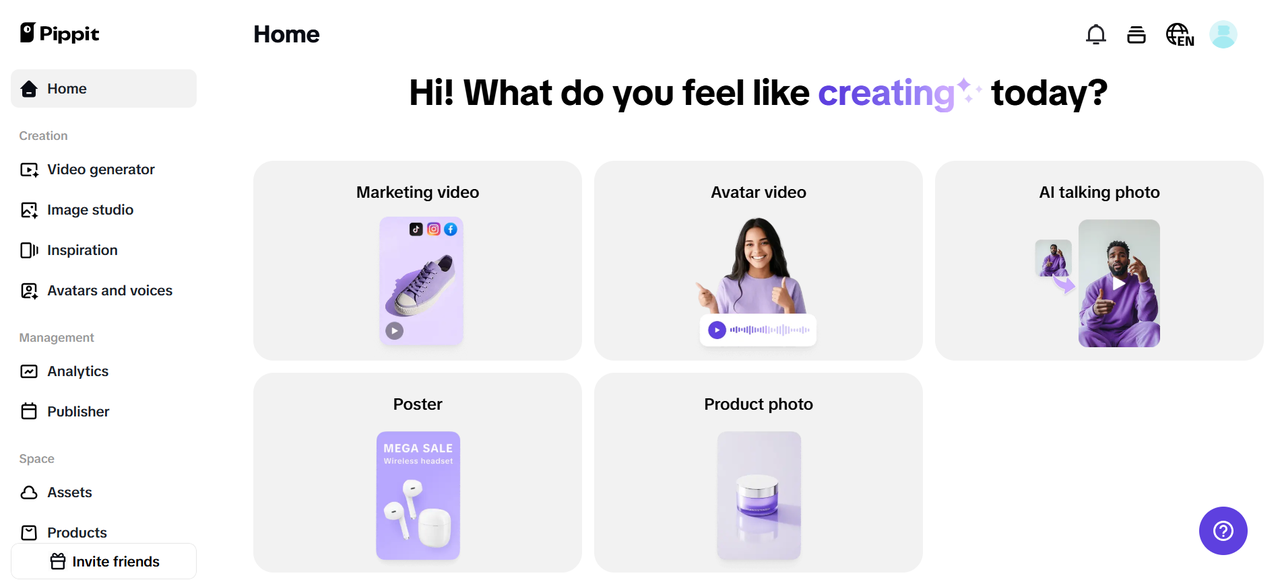
Step 1: Go To The Video Generator And Upload Media
Begin by logging into Pippit and going directly to your Video Generator module on your dashboard. There, you'll find a field labeled 'Start with your product link or media.' You can simply drop in an immediate link from your TikTok Shop, Shopify, or Amazon store - or use 'Add Media' and upload your raw video file from your computer. This lays the ground for simple editing, subtitling, and translation within a single workspace.
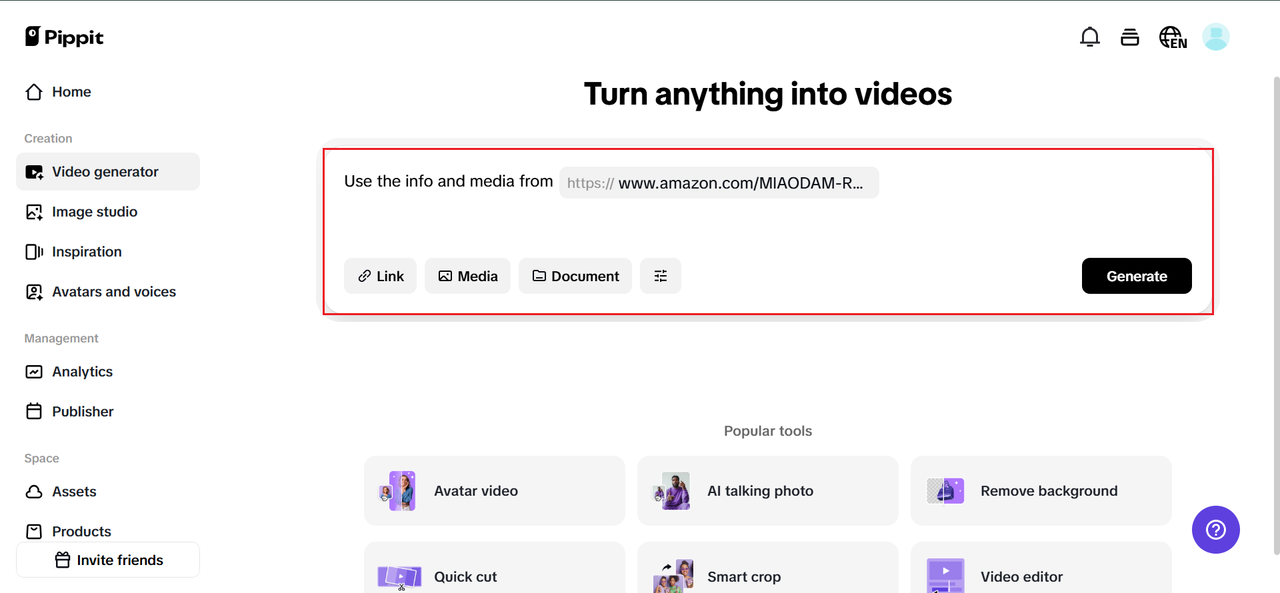
Step 2: Tailor Your Video Settings To Your Target Audience
After uploading your video into the system, double-check the product or video title - ensure it's concise and accurate. Next, highlight the most important features or moments you want viewers to watch for. From the Language dropdown, select the language you wish to translate your captions or scripts into. Fancy? Click 'Advanced Settings' to fine-tune the mood with alternative avatars, voiceovers, or script fine-tuning. When all is ready, click 'Generate' and let Pippit work its AI magic.
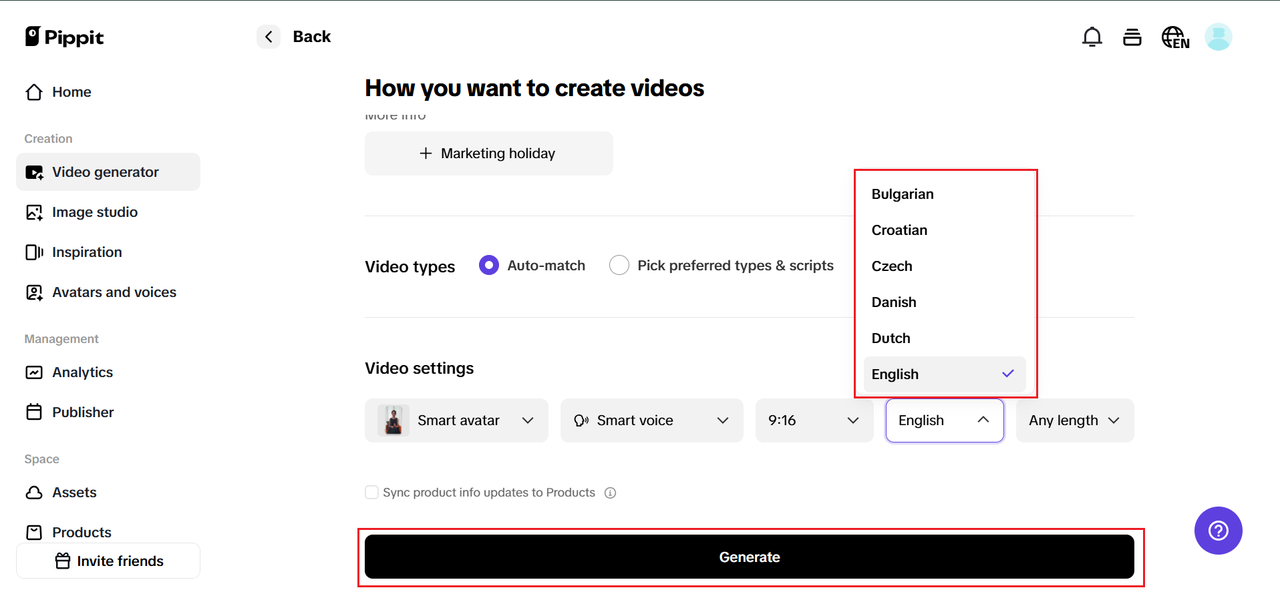
Step 3: Complete, Translate, And Export
Once your AI draft is complete, click 'Edit More' to launch Pippit's easy-to-use Image Editor. In the sidebar, locate captions and execute 'Auto Caption' to obtain your first subtitle layer. Next, tap the translation icon (that useful globe) to launch the translation panel. Choose your source language and target language, click 'Translation,' and check the results.
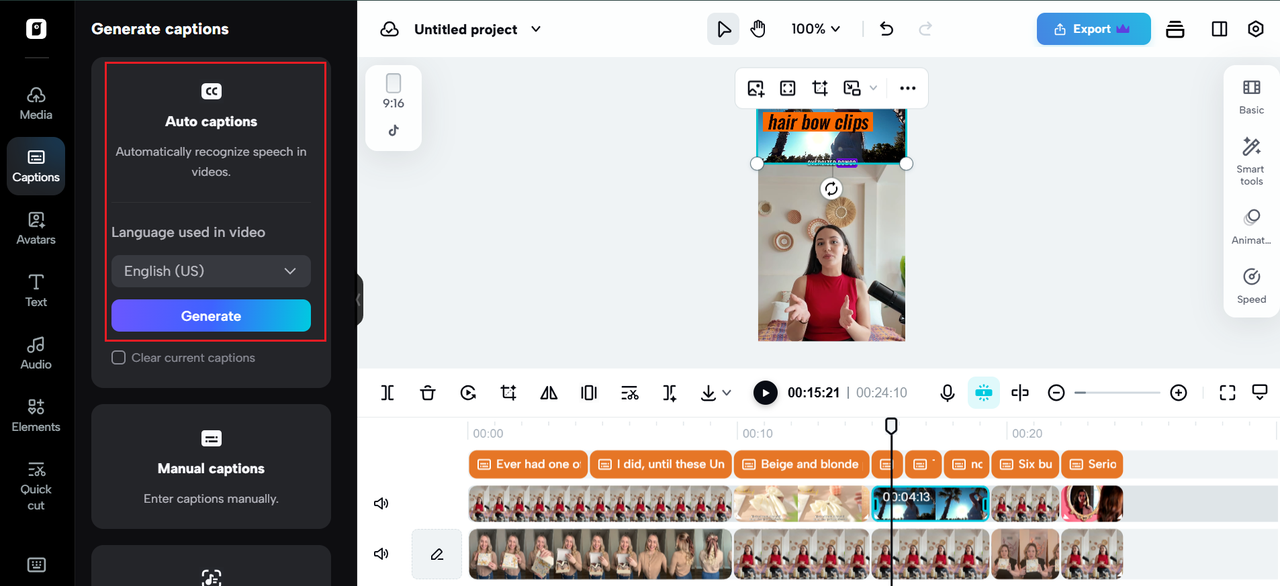
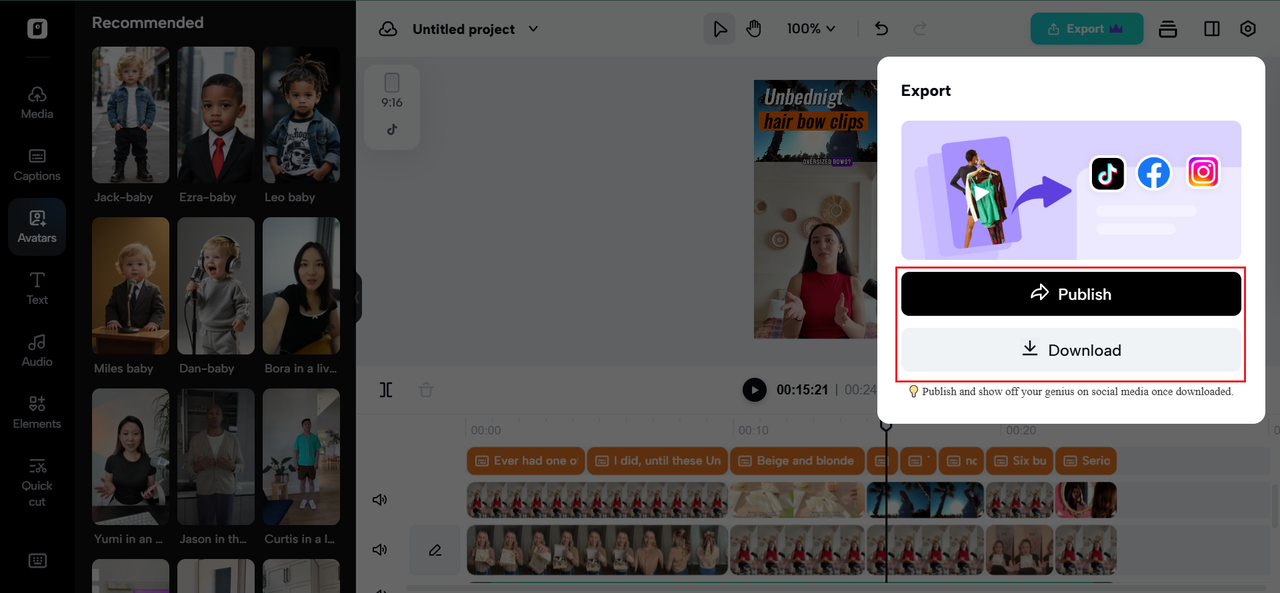
Make any necessary adjustments to the tone, line breaks, or wording to keep the captions interesting and culturally appropriate. Once you're satisfied, click 'Export,' select your preferred resolution and format, and your globally-ready video is prepared to impress viewers anywhere.
Keep Your Subtitles Human - Even When AI Helps
AI tools like Pippit are incredible, but never forget the human touch. Cultural context, humor, and brand tone are what make your captions feel authentic. Use the tech to save time, but always review the final version with fresh eyes - or even run it by a native speaker if you can.
Your Next Global Caption, Minus The Fails
Getting subtitles right isn’t just a nice-to-have - it’s a brand credibility must. The good news? It doesn’t have to eat up your day or budget. When you combine smart tools like a link to video converter and a free video translator with a few common-sense checks, you can rest easy knowing your captions work everywhere you post.So don’t let your next viral moment get lost in translation. Log in to Pippit today and see how easy it is to get your message across - in every language your audience speaks.
Jump to
The Cringe Factor: Real-life Caption Fails We’ve All Seen
Lost Viewers, Lost Trust: Why Translation Accuracy Matters
Your Easy Checks: Keep Captions Clear, Catchy, And Culturally Smart
Where A Free Video Translator Saves The Day
Translating Your Captions The Easy Way With Pippit
Keep Your Subtitles Human - Even When AI Helps
Your Next Global Caption, Minus The Fails

Finn Wilde
Author
For Finn Wilde, the wilderness is more than just a destination - it’s a way of life. Over the past decade, he has led multiple expeditions in some of the world’s most remote regions, from the icy fjords of Greenland to the rugged trails of Patagonia.
Finn emphasizes sustainability in all of his adventures, helping participants connect with nature while promoting responsible exploration. His expeditions inspire individuals to explore the great outdoors while fostering a deep respect for the environment.

Liam Jones
Reviewer
Liam Jones has made it his mission to prove that adventure doesn’t need a hefty budget. Having traveled to over 40 countries, he specializes in finding affordable ways to experience the world, from the best street food in Bangkok to hidden gems in Lisbon.
Liam’s travel tips have reached thousands of readers, empowering them to see the world on a shoestring budget without sacrificing quality. With a deep passion for local cultures, he continues to share his travel hacks, ensuring adventure remains accessible to all.
Latest Articles
Popular Articles